Tuesday, June 30, 2015

Low Light Photography

Low Light Photography

Low light photography is not necessarily just night photography, as many people assume. There could be different amounts of light coming from various sources and whatever is less than daytime light outside, I consider low-light. Indoors photography without much ambient light (as in many of our homes) as well as the light that is barely visible to our eyes at night, is also considered to be low-light. In this article, I will provide tips on how to take pictures in various low-light environments, whether indoors or outdoors.
Low Light Photography
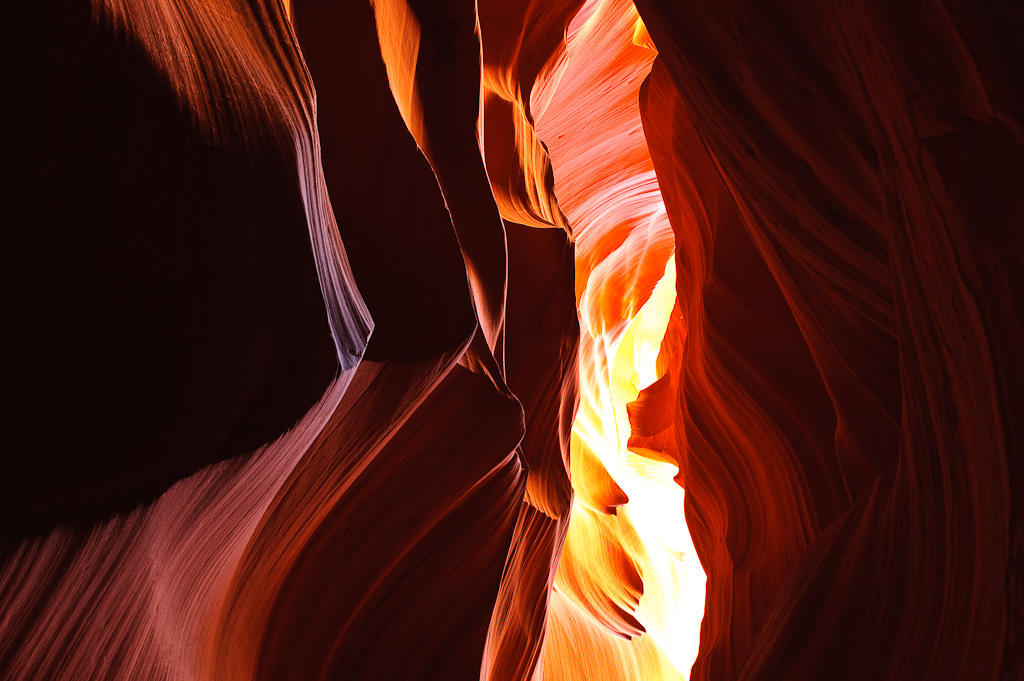
NIKON D700 @ 24mm, ISO 200, 5/1, f/10.0

Three levels of low-light

Before we go any further, let’s first identify the varying levels of low-light and categorize them, so that we could refer to them in examples. Although it is very hard to categorize the amount of light, due to the fact that it is a long range of light between very bright and pitch black, just for the sake of making it easier to explain and refer to, I still decided to divide it into three categories:
  1. Visible: in daylight, when you happen to be in shadow areas behind buildings, under large trees or bridges.
  2. Low Light: after sunset, when you can still clearly see everything around you, but you can tell that it is getting dark or when you are indoors.
  3. Dark: at night, when you can only see the brightest objects.
I’m sure you have come across all of the above situations at some point of time with your camera and perhaps even found it challenging and frustrating to take pictures in those conditions. Let’s go through the above one at a time and see what you can do to take good pictures in all low light conditions.

1) Low light photography: Visible Conditions

Have you had a situation where you were in a shadow during the day and tried to take a picture? This was one of my frustrations when I bought my firstDSLR, because I couldn’t understand why my pictures were coming out blurry. At times, the images on the rear LCD of the camera would look OK, but when I eventually viewed them on the computer screen, they would all be a little blurry. I had no idea why it was happening and really needed to find out why.
As I later found out, apparently, our eyes can see a much broader range of light, which is known as “dynamic range” in photography, than our cameras do. Therefore, even though you might think that there is plenty of light when you are in a shadow area, in fact, there might be inadequate light for the camera to effectively capture the image. Depending on your camera settings, there might be two consequences: a) you will have a blurry image and b) you might have a lot of noise in your image.
Low-Light Situation
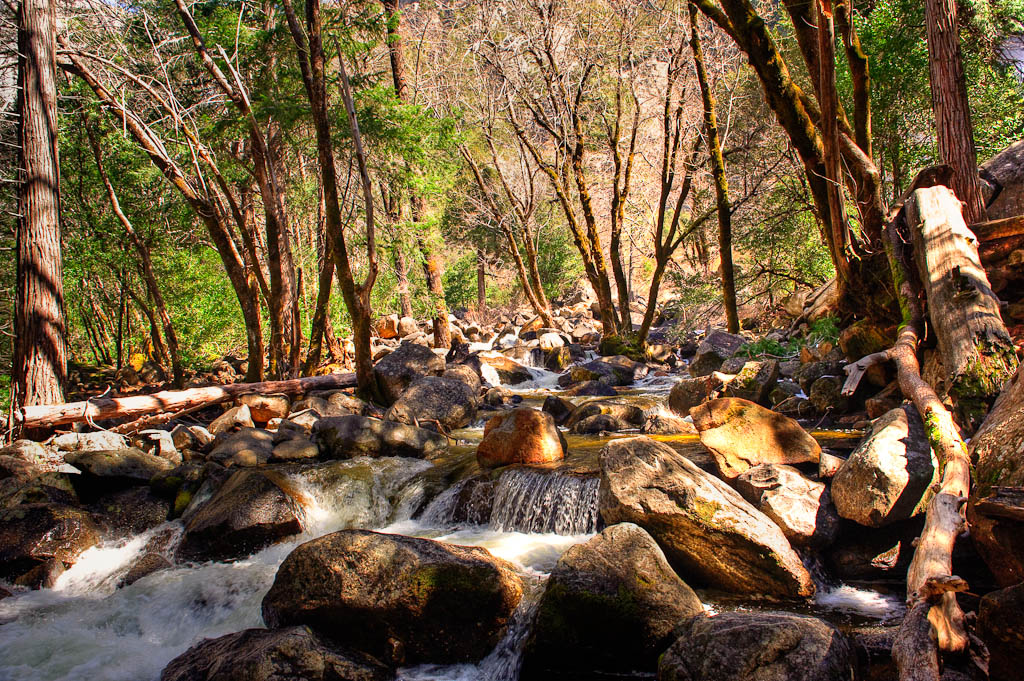
NIKON D700 @ 24mm, ISO 800, 1/125, f/8.0

1.1) Shoot at higher shutter speeds to avoid blurry images

So, why do blurry images happen? The answer is in the camera shutter speed. If the shutter speed is too low, you will get camera shake and/or motion blur from moving subjects. To avoid camera shake, you should always try to shoot at faster shutter speeds. You might ask “what is a fast shutter speed?”. It depends on the focal length of your lens. If you are photographing a subject with a wide-angle lens between 10-24mm, you might get away with shutter speeds under 1/50th of a second, depending on your camera hand-holding technique. If you are using a telephoto lens longer than 100mm, I recommend applying the hand-holding rule to calculate your optimal shutter speed. For most day-to-day photography, a shutter speed of 1/200th-1/250th of a second should be fast enough to yield sharp results and avoid motion blur.

1.2) Decrease your aperture to the lowest number (f/stop)

But to shoot at fast shutter speeds such as 1/200th of a second means that you need to have plenty of light. In our situation, we don’t have enough light, so what do we do? The first thing you will need to try to do is decrease your lens aperture to the lowest number on the camera. Decreasing your aperture means more light will pass through the lens into the camera body, which will allow you to shoot at faster shutter speeds. In order to do that, you would have to either switch to “Aperture Priority” mode or manually override your aperture in whatever mode you are using. Then, start lowering your aperture till you get to the lowest number your camera will allow.

1.3) Use a faster lens

The lowest number depends on the speed of your lens. Most consumer zoom lenses are limited to f/3.5 for maximum aperture, while professional zoom lenses have an aperture of f/2.8 and some prime (fixed) lenses can go all the way to f/1.2. How will decreasing aperture affect your shutter speed? Let’s say you were shooting at f/8.0 aperture and 1/125th shutter speed. Decreasing aperture to f/5.6 will double your shutter speed to 1/250th of a second, while lowering it to f/4.0 will quadruple the shutter speed to 1/500th of a second, which is plenty to freeze motion. If you have a fast lens with a maximum aperture of f/1.4 or f/1.8, just keep in mind that decreasing the aperture to the lowest number will also decrease the depth of field, so you will have to make sure to acquire correct focus before you take a picture. If you shoot Nikon, I recommend getting one of the following prime lenses, depending on your budget: Nikon 50mm f/1.4G, Nikon 50mm f/1.8D and Nikon 35mm f/1.8G (DX only). There is a similar selection for Canon Canon cameras: Canon EF 50mm f/1.4 USM, Canon EF 50mm f/1.8 II, Canon EF 28mm f/1.8 USM.
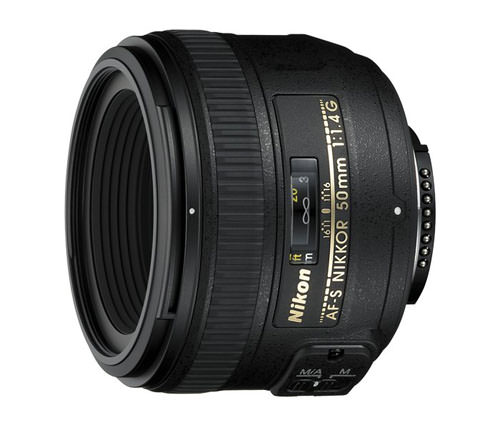
Nikon 50mm f/1.4G AF-S

1.4) Use a lens with VR/IS technology

Does your lens have VR (Vibration Reduction) or IS (Image Stabilization)? If no, that’s too bad, because VR/IS truly does work! The latest “VR II” technology by Nikon can allow you to shoot up to 4 times slower when it comes to shutter speed without adding any blur to the picture (realistically, it’s more like 3 times) compared to non-VR lenses. So, let’s say that with a regular lens you need 1/250th of a second to get a sharp picture. With a VR/IS system, you could lower the shutter speed all the way to 1/30th of a second or more and still get the same sharp image! Many of the consumer zoom lenses such as Nikon 18-55mm f/3.5-5.6G VR and Nikon 18-200mm f/3.5-5.6G VR II come with VR technology. While it is certainly nice to have VR in such versatile lenses, unfortunately, these lenses are also slower and not as sharp as prime lenses such as the Nikon 50mm f/1.4G. Zoom lenses with a fixed aperture and VR/IS technology are professional, expensive lenses such as the Nikon 70-200mm f/2.8G VR II (read my Nikon 70-200mm VR II review) pictured below and are also great choices for low-light photography.
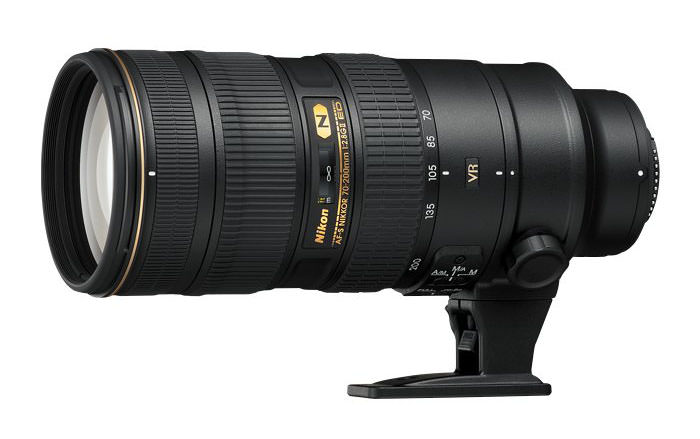
Nikon 70-200mm f/2.8G ED VR II Review

1.5) Increase your camera ISO

What if you have already decreased your aperture to the lowest number and you are still getting slow shutter speeds? The answer then is to increase the camera ISO (sensor sensitivity), to make the sensor collect light faster. If you are shooting at ISO 100 and your camera is telling you that the shutter speed is 1/25th of a second, you will need to increase your ISO to 400 to get the shutter speed of 1/100th of a second. How did I calculate that? Basically, doubling your ISO doubles your shutter speed. So, increasing the camera ISO from 100 to 200, increases your shutter speed from 1/25th of a second to 1/50th of a second. Then, increasing it further more from 200 to 400 increases the shutter speed from 1/50th of a second to 1/100th of a second. Technically, the shutter speeds in the cameras a little different (1/30th, 1/60th and 1/125th of a second), but I used the above numbers to make it easier to understand. The main thing to remember, is that doubling ISO doubles your shutter speed.
Standing in the shadows
NIKON D700 @ 24mm, ISO 1600, 1/25, f/8.0
Be careful with increasing your ISO to a big number, as higher sensor sensitivity means that more grain/noise will appear in your images. Most modern cameras can handle noise levels up to ISO 800 pretty well, while top-of-the-line full frame professional cameras can produce very little noise even at ISO 3200 and above.

2) Low light photography: Low Light Conditions

Let’s now move on to a more complex situation, where the amount of light is quickly diminishing after sunset or you are shooting indoors in a poorly lit environment. Obviously, the first thing to try is to decrease your aperture and increase your ISO, as it says above. But then you get to the point where you are maxed out on the aperture and have already reached ISO 800 and you are still not able to get sharp photos. What do you do then?

Sunset
NIKON D80 @ 52mm, ISO 200, 1/10, f/4.8

2.1) Stand closer to the light source

The closer you are to the light source, the more light there will be for your camera to use. Large windows are great sources of light, so open up those curtains and blinds and let the light get into the room. I forgot to bring the flashes when we were photographing the below group, so we quickly found a solution by opening up a large gate and letting lots of exterior light in.
Rocky Mountain Roller Girls
NIKON D700 @ 85mm, ISO 1600, 1/125, f/4.0

2.2) Stabilize yourself

That’s right – learn to stabilize yourself and hold your camera better. Use your left hand to support the camera by putting it with your palm facing up in between the camera lens and the camera body (or wherever the center of the weight is). Pull your elbows towards your body. If you can, sit down with your right knee on the ground and use your left leg as support by resting your left arm on it. Gently squeeze the shutter button and see if you can get a sharp image. Practice this and other techniques and you will be able to shoot at very low shutter speeds without introducing camera shake.

2.3) Push your ISO to a higher number

What is better, a blurry image or a sharp image with more noise? I prefer the latter. Push your ISO to a higher number and take a shot. See if the level of noise is acceptable to you. There are plenty of noise-removal programs out there such as Noise Ninja that can help you clean up an image. Try them out and see if the final result after post-processing is good enough for your needs. Although I personally try to stay below ISO 800, sometimes I push mine to ISO 1600 or even 3200, when needed. On my full-frame Nikon D700 body, I can push up ISO to 6400 every once in a while.

2.4) Shoot in RAW mode and slightly underexpose

I personally always shoot in RAW, because I can recover some detail from a picture if I overexpose or underexpose it. With a JPEG image, you have very limited options to recover an image. In some cases, I intentionally underexpose an image by using the exposure compensation button, which increases camera shutter speed. I typically allow 1-1.5 stops of negative exposure compensation…anything above that might not allow me to recover the details I need. Try it – it really works! Some photographers give advice to bracket exposures, but I personally prefer to use exposure compensation instead.
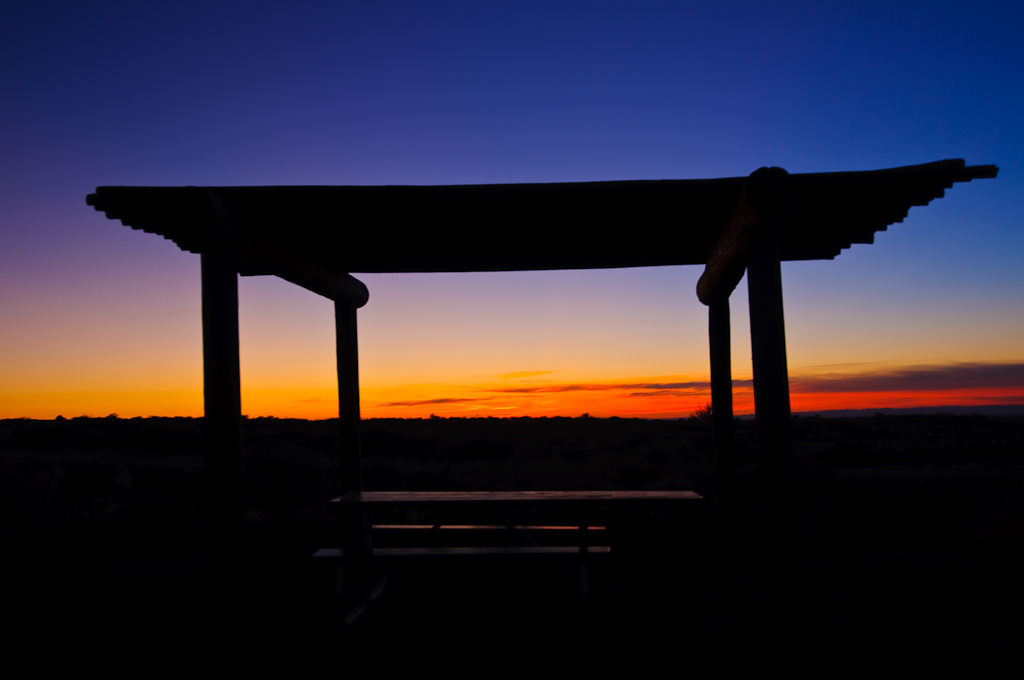
Sunset Gazebo
NIKON D300 @ 24mm, ISO 200, 1/5, f/5.0

2.5) Be careful about autofocus

In low-light environments, the camera might start to lose its autofocus capabilities. That’s what happens when there is not enough light – the camera cannot differentiate between objects anymore, just like if you were to point it at a plain white wall. Many DSLR cameras are equipped with an “AF assist” light in front of the camera that lights up just like a flashlight when there is not enough light to illuminate the subject. If you have such functionality, definitely turn it on in dim environments. On Nikon DSLRs, switch your camera from continuous mode (“C”) to single (“S”) mode to turn on this feature. When you focus on a subject, make sure that it looks sharp in the viewfinder. If it is blurry, try to re-acquire focus by half-pressing the shutter/autofocus button. In many cases you won’t be able to tell if the camera was able to focus correctly on the subject until you take the picture. In that case, make sure to zoom in and check for sharpness of the image on the rear LCD of the camera.

2.6) Use a full-frame camera

A full frame sensor is expensive, but very helpful in low-light situations. The Nikon D700 (FX/Full Frame) has approximately the same amount of noise at ISO 3200 as the Nikon D300 (DX/Cropped sensor) at ISO 800. It truly does make a huge difference in low-light environments. During my last trip to Vegas, I shot many of the images at night hand-held with the D700. If I had a DX sensor, I would have needed a tripod to get similar images, because I was already pushing the low-light capability of the D700 at that point.
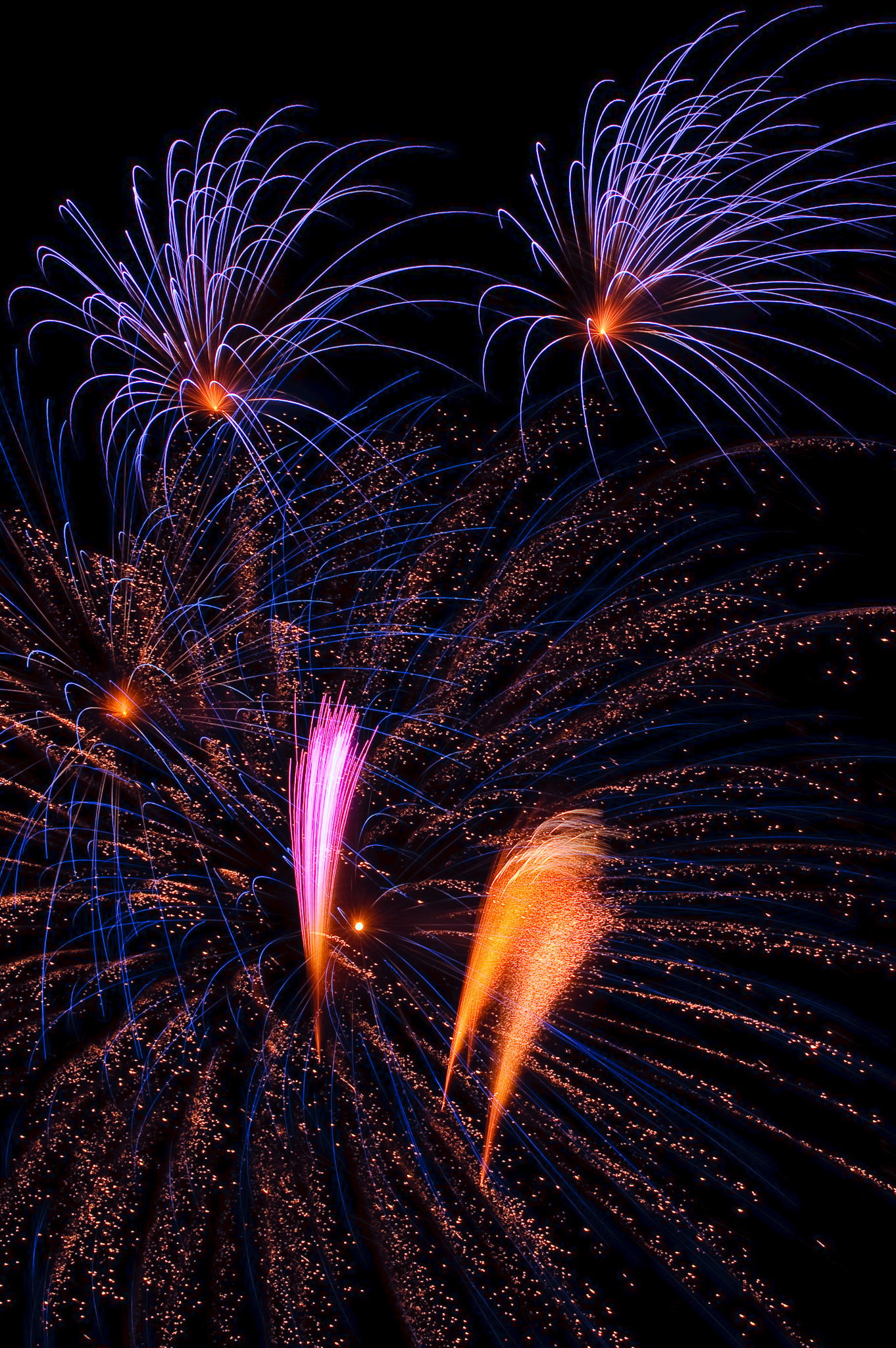
Fireworks 1
NIKON D700 @ 95mm, ISO 200, 3/1, f/20.0

2.7) Use a monopod or a tripod

And last, but not least, try using a monopod or a tripod that will really help with keeping your gear still. A monopod is helpful in some situations, but I personally prefer using a tripod for most of my low-light photography. With a tripod, you could set your ISO to the lowest number to decrease the amount of noise and shoot at very slow shutter speeds. Obviously, slow shutter speeds mean that you would get a lot of motion blur in your images, but in some cases it is not a problem and sometimes it even looks cool! Make sure to use a sturdy tripod, not one of those cheap plastic ones.

3) Low light photography: Dark Conditions

In poorly lit environments and at night, many of the above tips are useless, because you have no light to work with.

3.1) Use a tripod

Hand-held photography is simply impossible at night (unless you want to create a really bad-looking effect of motion blur). A good, sturdy tripod is a must for night photography, because you deal with very slow shutter speeds and every vibration matters. It is best to use a remote control or a cable release system with your camera in those situations, but if you do not have one, try using your camera timer. It is not as good of a solution as remote control, because you still have to press the shutter button, which temporarily vibrates the setup. Just use a longer time period for your timer and you should be good to go.

3.2) Use a flashlight for light painting

If your subject is too dark, use a flash light to add some light to it. Light painting is pretty cool and you can get some really nice shots by painting with the light, especially if you use different colors.
Light Painting
NIKON D700 @ 35mm, ISO 200, 30/1, f/6.3

3.3) Use manual focus

When it is too dark, autofocus will not function. If your subject is close, try to use your “AF Assist” light in the camera to get good focus. If your subject is further away, try using a flashlight to illuminate your subject and allow your camera to focus. If your subject is far away or you do not have a flashlight, you will need to manually focus on your subject. Most of the time, setting your lens to “infinity” focus works great, but in some cases you will have to try to take a picture, then adjust the focus as needed. Once you acquire focus, make sure to turn off autofocus so that the camera does not attempt to focus again. Obviously, do not move your tripod after focus is acquired.

3.4) Practice, practice and practice!

I don’t have to say much here – just practice as much as you can and you will get better in no time!
Low-light photography is a lot of fun and you should definitely play and experiment with your camera in different lighting conditions. If you learn how to take pictures in low light, you will have an opportunity to take some amazing pictures that have a different feel to them compared to everyday pictures in daylight 

Monday, June 29, 2015

Camera Flash Types

Camera Flash Types

Built-in & Pop-up Camera Flash
Built-in Flash and Pop-up Flash
Built-In & Pop-Up Flashes are flash units constructed within the main camera body. They are on-axis with the lens, so when you fire these flash units, the light fires in one direction only -- directly at your subject. This is usually problematic, because the on-axis light causes harsh contrast and hard shadows; not to mention causing the background to be unreasonably dark. We’ve all seen this problem in photos, usually ones that our friends take at night or inside at clubs and parties. You can avoid this unsightly effect by balancing the flash with the ambient light in the scene. You do this by metering the scene – without the flash – and then turning the flash on and taking your photo.

Dedicated Camera Flash

Dedicated Camera Flash
The dedicated flash is a flash unit that fits into your camera's hot shoe (that slot on the top of the camera body). The dedicated flash is a great piece of gear that communicates with the camera. In combination, the camera and flash use information about lens length, ISO sensitivity, f-stop and shutter speed to determine optimal flash-strength output. The dedicated flash is preferred over the Built-in/Pop-up flash for many reasons, but one of the best is that you can avoid red-eye by angling the flash and bouncing the light onto your subject. In addition, many dedicated flashes pre-flash to get your subject’s pupils to constrict and avoid red-eye. A dedicated flash is a far better tool than the built-in flash because of the versatility it gives you. Even more versatile is if it comes with a cable, allowing you to detach the flash unit and position it at any angle for the best possible photo... and believe us you'll be impressed by the freedom.

Macro Ringlight Camera Flash

Macro Ringlight Camera Flash
A ringlight flash fits on the barrel of the lens by screwing onto the attachment threads. It provides a soft, diffused light source that is ideal for Macro Photography. The fragile parameters of Macro photography preclude using a built-in flash, and a dedicated flash unit doesn't have the exacting direction capabilities to properly illuminate a Macro subject. The Ringlight Flash enables you to get as close as possible to your close-focus subject and flash it with a light source that will not give you hard contrast or shadows. Instead you’ll get soft, even illumination that will bring out the details.

Hammerhead Camera Flash

Hammerhead  Camera Flash
A hammerhead flash is a flash unit that is separate from the camera and is not attached to the hot shoe; it screws into your camera’s tripod bushing. The flash unit sits to the side of the camera and it off-axis just enough to limit red-eye in your subjects. It’s a favorite among press and wedding photographers because the hammerhead has a high light output and it provides a better angle and grip than other types of flashes.

Fill-in Flash

Fill-in Flash
The fill-in flash isn't a separate flash unit, but rather a technique used when the background is much brighter than your subject, or the lighting is such that you have a high levels of contrast on your subject. As the name suggests, you use the fill-in flash to add fill light to the subject so it registers a more pleasing exposure. This is useful when the ambient light is overwhelming and would typically result in some level of silhouette. You'll want to turn on your flash when you're outside and meter the key part of your subject (i.e. a person’s face) that appears to be in "shadow" compared to the rest of the scene. Your image will be more balanced, and more pleasing.

Bounce Flash

Bounce flash is also a technique, not a flash unit. You will get more aesthetically pleasing images when you bounce the flash off of a surface to illuminate your subject instead of the direct, on-axis illumination that you get from most flashes. You need a dedicated flash unit to bounce the flash off the ceiling or a nearby wall. This technique opens up a whole new world of great photography, particularly if the dedicated flash is tethered to your camera with a cable.

Conclusion

There are many different ways to get additional illumination with the various described flash units. The real trick to using them effectively, and not like an amateur, is to understand the parameters of what the flash can do, understand the lighting dynamics of the situation you are in -- and then get creative! Each of the specialty flash units work well with what they’re designed for and will improve your photographs immeasurably – with practice! In untrained hands, the flash causes more problems than it solves (so it’s recommended that you avoid the use of flash when you can). You can often get an effective shot without using a flash, and it’s best to choose a flash unit and accessory that will help you get the image you want. It is important to know how to use the flash wisely.

ISO settings in low light: when, and how, to increase your camera’s sensitivity

ISO settings in low light: when, and how, to increase your camera’s sensitivity


You can get some great pictures in low light, but only if you know how, and when, to use your camera’s ISO settings. In this tutorial we show you everything you need to know.
ISO settings in low light: when, and how, to increase your camera's sensitivity

Your camera can automatically set the exposure in any conditions, even indoors or at night. To do this it adjusts the lens aperture and uses slower shutter speeds so that the sensor is exposed for longer.
There comes a point, though, when the shutter speed is so slow that there’s a danger the camera will move during the exposure, leading to camera shake and horribly blurred pictures.
It’s difficult to give hard and fast rules about when camera shake might start to creep in, but as soon as you see shutter speeds of 1/30 sec or slower displayed in the viewfinder, you’re in danger territory.
If your lens has an image stabilisation function, this will certainly help, but only up to a point.

 What is ISO: when to increase sensitivity, types of noise and more
This is like turning up the volume on the sensor – it makes it more sensitive to light. Your camera can now use faster shutter speeds in poor light, and you can carry on getting sharp pictures.
ISO settings are adjusted on a fixed scale (see overleaf), and each step on the scale doubles the sensitivity.
But there is a payoff. As you increase the ISO settings, the digital ‘noise’ in your pictures increases too. This noise is like the grain in high-speed film, but more pixelated and less attractive. When you increase the ISO you’re trying to choose the best compromise between picture quality and usable shutter speeds.
You don’t always have to use a high ISO settings in low light, though. If you put the camera on a tripod, long exposures don’t matter because the camera won’t move – you can shoot at night using a low ISO for best quality.
So follow our guide to find out when, how and why to change your ISO settings to get the best possible light in what may be the worst possible lighting conditions.
Banish bad pictures – 9 quick fixes to common camera complaints

How – and when – to use your higher ISO settings

How - and when - to use your higher ISO settings: step 1

01 What ISO settings are you using?
Do your shots look as blurry as this when you shoot indoors? That’s because the ISO setting on the camera is too low, and it’s using longer exposures (slow shutter speeds, in other words) to cope with the low light. At ISO200, the camera had to use a shutter speed of 1/5 sec.

How - and when - to use your higher ISO settings: step 2

02 Increasing the ISO
On our Nikon D300s, we press the ISO button on the back of the camera and turn the command dial. On other models, you can use the Shooting menu or the interactive display. If you increase the ISO from 200 to 3200, the camera can use shutter speeds four stops faster.

How - and when - to use your higher ISO settings: step 3

03 Sharper shots
With the ISO set to 3200 we’re getting shutter speeds of 1/80 sec to 1/125 sec. That’s enough to dramatically cut the risk of camera shake, and it can also cope with a certain amount of subject movement, which is especially useful with fairground attractions and arcades.

How - and when - to use your higher ISO settings: step 4

04 Image stabilisation verdict
If your lens has IS, switch it on. This will help cut camera shake, but it has limitations. You may be able to shoot at shutter speeds up to four stops slower without shake, but it won’t help with moving subjects – here, there’s no substitute for higher shutter speeds.

How - and when - to use your higher ISO settings: step 5

05 Static subjects
VR can pay dividends with static subjects, though, and you can get away with shutter speeds as low as 1/15 sec, 1/8 sec or even slower. But take several shots, not one, to be sure of getting one that’s sharp. Continuous mode can be useful because it gives the camera time to settle.

How - and when - to use your higher ISO settings: step 6

06 Brace yourself!
In really dark environments, even a high ISO is no guarantee of fast shutter speeds. Here, we’re having to shoot at just 1/15 sec. In these situations, try to brace the camera or rest your elbow on a rigid surface.
How - and when - to use your higher ISO settings: step 6


Aim Hi-er?
ISO settings are the same across all cameras. The upper and lower limit varies from one DSLR to another, but the numbers are always the same. Many DSLRs also offer extra ‘Hi’ settings which extend the ISO range beyond the normal limits and don’t necessarily conform to the strict performance parameters of the regular ISO settings. ‘Hi’ modes produce more noise and softer detail, and while they’re useful in an emergency, generally they’re best avoided.

Sunday, June 28, 2015

Using polarizing filters to cut through haze and deepen blue skies

Using polarizing filters to cut through haze and deepen blue skies

Landscape shots with distant subjects like canyon rims or mountain ranges can often look hazy even under the sunniest conditions. One of the most effective ways of cutting through this haze and capturing a vibrant photo with saturated colours and a deep blue sky is to use a polarizing filter. In this workshop we’ll show you everything you need to know.

The photo of the mountain range, above left, may have been taken under bright, sunny conditions, but the result looks hazy and is lacking impact. The photo above right was taken under exactly the same lighting conditions only moments later, but with a polarizing filter set to deliver its maximum effect. The difference is dramatic: the haze has been eliminated, resulting in a much more vibrant image. In our video tutorial below, we’ll explain how to achieve this effect, and at the bottom of the page you’ll find a reminder of the steps you’ll need to take, along with additional tips.

How to photograph landscapes with lots in focus

How to photograph landscapes with lots in focus

Landscape photos can often benefit with something in the foreground like a tree or a fence, but the problem is making sure it’s all in focus. In the photo below left, using the camera’s automatic settings, the background is sharp, but the grassy ledge in the foreground is blurred. In the photo below right though, I’ve adjusted the camera’s ‘aperture’ setting to increase the range of distances in sharp focus.

In my video tutorial below, we’ll explain how to achieve this effect, and at the bottom of the page you’ll find a reminder of the steps you’ll need to take.

How to take portraits with a ‘fill-in’ flash

How to take portraits with a ‘fill-in’ flash


1: Switch your camera to Program mode by turning the mode dial to ‘P’.
2: Popup your built-in flash. On some models you’ll press a button labelled with a lightening symbol, while on others you’ll manually lift the flash open. Check your manual.
3: Simply take the photo as before. Your camera will balance the light from the flash and the background.
4: If the person is now too bright, either set your flash compensation settings to a negative value, or simply stand back a little.
5: After taking your photo, push the flash back down for protection and if desired, set the mode dial back to Auto mode.

How to brighten daytime portraits with a fill-in flash

 How to brighten daytime portraits with a fill-in flash

If you’re taking photos of people on a bright or overcast day, you can often find them appearing a little too dark on the photo. This is because the camera’s been fooled by the bright background and reduced its exposure to compensate. The result is a perfect-looking background but an underexposed person in front of it. The trick here is not to brighten the overall exposure, but to simply use your flash to boost the foreground light. This is called a ‘fill-in’ flash and in this workshop I’ll show you what you need to do.


The photo above left was taken on an overcast day with the camera’s automatic settings, where the background looks fine but the person’s underexposed. In the photo above right, I’ve simply set the flash to go off. This has provided a boost to the foreground, illuminating the person while keeping the background perfectly exposed. In my video tutorial below, I’ll explain how to achieve this effect, and at the bottom of the page you’ll find a reminder of the steps you’ll need to take.

Friday, June 26, 2015

Every new photographer must know

Every new photographer must know


1. Why Single Lens Reflex 

The name single lens reflex camera seems rather odd today, but there was a time when twin lens reflex (TLR) cameras were very popular – there are still one or two models on sale today.
The two lenses of an TLR have the same focal length and their focusing mechanisms are linked, but they are used for two different tasks.
The ‘viewing lens’ is used for focusing while the photographer looks in the waist-level viewfinder, while the ‘taking lens’ sits in front of the film, ready for exposure in a separate chamber.
The word ‘reflex’ in the name stems from the fact that TLR and SLR cameras have a reflex mirror, essentially a mirror at 45 degrees, that reflects light from the lens into the viewfinder.

2. The viewfinder is optical

Nikon D5300 vs D5100 vs D5200: 06 Viewfinder

Digital SLR cameras have an optical viewfinder that receives light from the same lens as is used to capture the image.
When the mirror is down, the light exiting the lens is reflected up into a pentaprism (or pentamirror) which bounces the light around to produce an image on the viewfinder screen that is the right way round.
This enables SLRs to be smaller than TLRs and solved the problem of parallax error encountered with rangefinder cameras – they don’t see the scene through the lens.
Modern digital SLR viewfinders are generally bright and pleasant to use, but unlike the electronic viewfinders found in many compact system cameras, they can’t show the impact of camera settings.
The reflex mirror lifts just before an exposure to allow light to reach the sensor, this causes the viewfinder to go black during exposure.

3. Exposure is controlled by shutter speed, aperture and sensitivity


There are three means of controlling exposure with a digital SLR camera: shutter speed (exposure time) aperture and sensitivity, often called The Exposure Triangle.
While shutter speed and aperture size control the amount of light that reaches the sensor, the camera actually has a base sensitivity that remains constant.
Other sensitivity settings are created by applying gain (amplification) to the image signal (more on this later) to replicate the effect of a more sensitive medium.

 4. Most offer a collection of exposure modes

Manual is the most flexible of the exposure modes

Most modern SLRs offer a wide range of exposure modes from fully manual to fully automatic with semi automatic options such as aperture priority and shutter priority mode in between.
There is also usually a collection of scene modes in which the camera selects exposure and processing settings that suit that particular type of scene.
These scene modes may be selected by the photographer, but many cameras now offer a mode in which the camera detects the type of scene before it and then sets appropriate exposure and processing settings.
In aperture priority mode the photographer sets the aperture to control depth of field and the camera sets a shutter speed that will produce a good exposure.

The new Sony A7R II has specs you won't believe

The new Sony A7R II has specs you won't believe


The new Sony A7R II has specs you won't believe

Sony upgrades its top full-frame CSC with a new sensor, in-camera 4K video, 5-axis stabilization and more


The A7R II is Sony's top compact system camera, though in appearance it looks like more like a small DSLR. It uses a mirrorless design, so the viewfinder on the top is electronic rather than optical. The A7R II is designed for professional photographers and movie makers, and it's a major upgrade over the original A7R, launched in October 2013.
The big story with the A7R II is its sensor. It has a resolution of 42.4 megapixels, which is the second-highest resolution of any full-frame camera, beaten narrowly by the 50-megapixel sensor in Canon's new EOS 5DS.
It beats the 36 million pixels of its predecessor, the A7R, and the Nikon D810, previously the highest-resolution DSLR on the market.

It's not just about the megapixels

The 6 megapixel advantage the A7R II has over its predecessor will make a small but useful difference to the resolution, but just as important is Sony's decision to dispense with an anti-aliasing filter. Traditionally, these are used in front of sensors to reduce the risk of moiré or interference effects when photographing fine textures and patterns, but anti-aliasing filters also blur fine detail very slightly, and with today's high-resolution sensors it's clear that they're seldom necessary. Removing the filter gives the A7R II's sensor an edge - literally - when it comes to rendering fine detail cleanly.
Sony A7R II
Sony A7R II
It's also the world's first full frame 'back-illuminated' sensor. The electronic circuitry which normally sits over and around the photosites has been moved to the back of the sensor - the photosites are larger and can gather more light. As a result, the A7R II has a maximum ISO setting of 102,400 - that's two stops (2EV) higher than the old A7R.
Sony points out that photographers have traditionally had to choose between cameras with high resolution but low sensitivity in poor light, or those with high sensitivity but low resolution - the A7R II appears to offer both.

Faster focusing

The sensor brings another innovation - no fewer than 399 phase detection AF points. This makes the A7R II's autofocus system 40% faster than its predecessor's. Phase detection autofocus works by comparing views of the subject from two slightly different positions, and the degree by which these views are 'out of phase' tells the autofocus system how far to re-focus and in which direction.
Sony A7R II
Sony A7R II
Previously available only on digital SLRs using separate AF sensors, it's now appearing in the form of on-sensor AF points which work in the same - and work alongside traditional sensor-based contrast AF to produce hybrid systems which combine both speed and accuracy.
Sony says its new AF system also offers the widest autofocus coverage for any full-frame camera. It has an 'advanced' motion detection algorithm which helps the camera shoot at 5 frames per second with autofocus tracking. It also works with Sony A-mount lenses via Sony's LA-EA3 or LA-EA1 adaptors.

Full-on 4K

The big news for videographers, though, is the A7R II's new 4K video capability. Sony already has a full-frame 4K camera in its range - the A7S - but unlike this model, the A7R II can save its 4K footage internally to a memory card. It can work with an external recorder, but it's not essential.
The A7R II supports both Super 35mm and full frame formats, and uses Sony's XAVC format to record 4K at 100Mbps and full HD at 50Mbps. For videographers, the 'bitrate' is a crucial guide to likely image quality.
The A7R II's high speed data transfer rates mean it can also shoot slow-motion footage at high frame rates - you can shoot 720p standard HD footage at 120fps for a 4x slow motion effect in playback.

Sharper, steadier, longer-lasting

The A7R II also inherits the 5-axis stabilization system first seen on the Sony A7 II, but specially tuned for the higher resolution sensor. It moves the sensor to compensate for any camera movement during the exposure, or while filming, and it means you don't need image-stabilized lenses - although it will work fine with stabilized Sony lenses.
Sony A7R II
Sony A7R II
Sony says it has also reduced shutter vibration by 50% compared to the A7R and the shutter now has a life expectancy of 500,000 shots - that's right up with the best professional DSLRs.
The original Sony A7R was impressive, but the specs of the A7R II are simply spectacular. The Sony A7R II will be available in August for $3,200 (about £2061, AU$4131).