Sunday, July 26, 2015

Canon EOS 5DS vs 5DS R: What's the difference? 50-megapixel DSLR camera specs explored


Think that the Nikon D810 is high resolution? Think again. Canon has unveiled the EOS 5DS and 5DS R models, each boasting a 50.6-megapixel full-frame sensor at their core, making them the highest-resolution DSLR cameras on the market.
So what's the difference between the two? Both cameras are built around the same 5D Mark III body (with minor tweaks to grip and style), but the R has a dual low-pass filter (LPF) system, which is said to act like a LPF-free solution for sharper images.
Design
Exterior design differences come down to the name badges only: the 5DS opts for a golden finish, the 5DS R a silver and red badge.
Both models are built around the weather-proofed 152.0 x 116.4 x 76.4mm footprint of the earlier 5D Mark III body. There's a new base plate and different mirror box assembly than the older Mk III model, to incorporate a mirror vibration control system to ensure limited affect from the mirror - an essential at this ultra-high resolution.
Compared to the Mk III there's also a subtle left-hand grip, to make for better two-handed holding, again for added stability.
Sensor
The sensor found in both models is one and the same, a 50.6-megapixel full-frame (36 x 24mm / 35mm film equivalent) sensor, matched with dual Digic 6 processors for fast processing.
The difference is the 5DS utilises a low-pass filter (LPF), to diffuse light and avoid moire and false colour effects (although, at this resolution, we're not convinced it's a necessary feature).
The 5DS R, on the other hand, is trying to achieve a LPF-free result by using two low-pass filters - one to counteract the first's effects. Sounds a bit bonkers, why not just remove the filter altogether? But then the focal plane of the sensor would have to be adjusted to achieve accurate focus, and as the 5DS R is built around the 5D MkIII's frame, it's had to employ a different work-around. Which makes it sound like a last-minute decision in many respects.
The result of the 5DS R, according to Canon, is sharper images, but with greater risk of moire in some scenarios. Great for many landscapes, not so good for shooting pin-stripe suits in the studio.
Autofocus & speed
Adopting the same 61-point autofocus system as found in the 5D MkIII reaps the same fast results. However, at this 50-megapixel resolution there's a greater chance of soft images if you go about shooting as you would with an 18-megapixel camera. Any given subject will lie across a greater number of pixels, so subtle movements have a greater impact to results - higher shutter speeds, slower subject movement, and better camera stability are all ways to counteract such effects.
A point of difference compared to the 5D MkIII, however, is that 1.6x and 1.3x crop options deliver respective 19- and 30-megapixel results, but benefit from a tighter autofocus arrangement within the active viewfinder area. So with 1.6x selected, the autofocus arrangement covers the majority of the frame.
Impressively both models can snap five frames per second (5fps) at full resolution thanks to the dual Digic 6 processors.
Movie
However, despite the considerable buffer Canon does not offer 4K movie capture. Instead it's 1080p Full HD available at the full range of 60/50/30/25/24fps.
With the focus on being stills cameras, the 3.5mm headphone monitoring port found in the 5D MkIII has gone, replaced in both 5DS and 5DS R by a USB 3.0 output for fast transfer of images.
Price and release date
The other crucial difference is price. The 5DS will be priced £3,000 body-only, while the 5DS R adds an extra £200 to the asking price. Both models will be available June 2015.

Friday, July 24, 2015

You're not a pro but you want a nice camera. What do you buy?

While compact system (mirrorless) cameras have eaten into their market share to an extent, SLRs remain the weapon of choice for many enthusiast photographers. It's not hard to understand why; enthusiast-level SLRs offer near pro-levels of performance at an affordable price, are relatively to easy to use, and give access to a massive range of lenses and accessories. Indeed, some enthusiast SLRs rival pro-spec models, blurring the boundary between the two.
Many photographers prefer the reassuringly chunky feel and build quality of SLRs, as well as the more traditional optical viewfinder and fast, phase-detection autofocusing. Enthusiast-level SLRs include both APS-C and full-frame sensors; to recap, a full frame sensor is the same size as 35mm film negative 'frame.' This means that its light sensitive photosites (pixels) can be larger than those on APS-C format sensors, so more light can enter them - which can mean better dynamic range and less noise in low-light shooting. APS-C sensors are physically smaller and are subject to a focal length multiplication factor (the so-called 'crop factor) in comparison to full-frame cameras.
That said, APS-C sensors in the best enthusiast SLRs still offer high resolution, and lenses for APS-C cameras are cheaper than their full-frame equivalents.
Here are some of our favourite enthusiast-level SLRs.

Canon EOS 6D

EOS 6D
  • Sensor size: Full frame
  • Pixel count: 20.2Mp
  • Screen type: 3-inch LCD, 1,040,000 dot
  • Maximum continuous shooting rate: 4.5fps
  • Maximum video resolution: 1080p
The Canon EOS 6D is a great example of a compact full-frame camera, weighing in at almost 200g less than its bulkier big brother, the Canon 5D Mk III. It's built to last though, with front and back sections made from sturdy magnesium alloy. In many ways, the handling and build quality is similar to the APS-C format Canon 60D, but there are some significant differences. As with the 5D Mk III, the 6D lacks a pop-up flash; while most serious photographers would only use a flashgun anyway, built-in flash can come in handy for wirelessly triggering off-camera flash units or basic fill-in flash in strong sunshine. The 6D also lacks a vari-angle/touchscreen LCD, which is a frustrating omission.
What the 6D lacks in mod cons it makes up for in resolution, and it packs a 20.2Mp full-frame sensor that's almost the match of the one in the 5D Mk III. It's got the same Digic 5+ image processor, too. Compromises have been made with the autofocus, however. The 6D gets by with only 11 AF points, and only the centre point is cross type. Connectivity is good, with both onboard Wi-Fi and GPS (though the latter quickly drains the battery). High ISO performance is impressive and there's a good range of advanced shooting features, but if the restricted AF options are a worry, you might be better off stumping up for the full-fat 5D Mark III.

Nikon D610

D610
  • Sensor size: Full frame
  • Pixel count: 24.3 Mp
  • Screen type: 3.2 inch LCD, 921,000 dots
  • Maximum continuous shooting rate: 6fps
  • Maximum video resolution: 1080p
Nikon's D600 was initially welcomed as a cheaper and in many ways more practical alternative to the 36Mp behemoth that is the D800/D800E, but dirty sensor issues soon rained on its parade.
The updated version, the D610, is very much the camera that the D600 should have been. An updated shutter mechanism seems to have stopped the mystery gunge appearing, and you're getting all the benefits of full frame - detailed wide-angle shots and fine depth of field control - at a reasonable price.
The larger photosites on its sensor give the 610 greater dynamic range and cleaner images at higher ISOs than the D7100, even though it can't resolve more detail. With a part-magnesium alloy body, the D610 is tough enough for demanding use, and weather seals mean you can keep shooting when the heavens open.
As with the D800, there are plenty of direct control buttons, which make adjusting key settings a lot easier. The downsides are the lack of onboard Wi-Fi, and the absence of a touchscreen/vari-angle screen is also disappointing on a camera at this price. Still, the D610 has become significantly cheaper since it launched, making it a very attractive first full-frame SLR for Nikon fans.

Canon 70D

EOS 70D
  • Sensor size: APS-C
  • Pixel count: 20.2 Mp
  • Screen type: 3-inch fully articulated LCD touchscreen, 1,040,000 dots
  • Maximum continuous shooting rate: 7fps
  • Maximum video resolution: 1080p
This well-regarded - and well-rounded - enthusiast-level SLR features a 20.2Mp APS-C format sensor, and enables 'Dual Pixel' phase-detection focusing for both Live View and video mode.
Both Live View and movie focusing are fast and decisive, and work well with the touchscreen (a welcome addition). There are also plenty of physical controls for traditionalists.
Other highlights of this enthusiast-friendly SLR include an impressive maximum continuous shooting rate of 7 frames per second (for 65 JPEGs or 16 raw files) and a native sensitivity range of ISO 100-12,800 (expandable to ISO 25,600). Wi-fi is built-in too.
So, is this the perfect enthusiast SLR? It does have some downsides, but not many. There is a good range of Creative Filters, but these can only be used on JPEG images, not raw. Also, the viewfinder level can be difficult to see, and you have to be careful with the otherwise excellent metering system in high contrast scenes. Some photographers might find the 19 point AF system somewhat limited compared to the 51-point system on the Nikon D7100, too. Otherwise this is a great example of a well-priced yet powerful enthusiast SLR.

Nikon D7100

D7100
  • Sensor size: APS-C DX
  • Pixel count: 24.1Mp
  • Screen type: 3.2-inch LCD, 1,228,800 dots
  • Maximum continuous shooting rate: 6fps DX mode, 7fps in 1.3x crop mode
  • Maximum video resolution: 1080p
This is an interesting camera, not so much for what it has - an 24.1Mp APS-C sensor is not particularly earth-shattering - but for what it lacks, namely an anti-aliasing filter. By removing this 'low pass' filter, Nikon claims that sharper images are possible straight from the camera. While there is a greater risk of 'moire' interference patterns as a result, Nikon claims the pixel density of the D7100's sensor means there will be few occasions when this is a problem - and that it's a trade-off are most users are happy to make in return for extra sharpness. Certainly, our test images were crisp and detailed, and noise is well controlled up to ISO 6400.
The D7100 is Nikon's flagship enthusiast SLR, and offers a continuous shooting rate of 6 frames per second (this can be pushed to 7fps if you use the 1.3x crop mode). There is also a generous 51 point autofocus system. One thing to watch out for is the tendency of the D7100's matrix metering system to underexpose, particularly with bright skies.
As with the D610 there is no built-in Wi-Fi or articulated screen/touchscreen, but the optical viewfinder shows approximately 100% of the image, which aids accurate composition.
To sum up, the D100 is a very practical enthusiast-level SLR, with weatherproof seals for shooting in the rain and excellent ergonomics.

Pentax K-3

Pentax K-3
  • Sensor size: APS-C
  • Pixel count: 24.4Mp
  • Screen type: 3.2-inch LCD, 1,037,000 dots
  • Maximum continuous shooting rate: 8.3fps
  • Maximum video resolution: 1080p
Here's another weatherproofed enthusiast-level SLR, again with a 24Mp sensor and again lacking an anti-aliasing filter, with the promise of sharper images from the camera. Unlike the Nikon D7100, however, there is an anti-aliasing simulator if moire pattern interference becomes an issue.
As Pentax's flagship enthusiast SLR, the K-3 features a PRIME III imaging engine that supports a brisk 8.3 frames per second continuous shooting. You can record up to 22 images in raw format at a time, or 60 JPEGs. Meanwhile the AF system has 27 autofocus points, 25 of which are cross type for increased accuracy, and the AF module is sensitive down as far as -3EV.
Image performance is generally good, with impressive detail and sharpness, and colours are nicely saturated without looking garish. The 100% viewfinder is a bonus, too. Sadly, the K-3 is dogged by chromatic aberration; this appears to be in issue inside the camera, as it appeared even when we changed lenses, and also cropped up on a fresh review sample. How much of a problem this will be depends on what you shoot and how you print it, but the bigger you print, the more likely you are to notice the aberration. As with the Nikon D7100, the Pentax lacks an articulated screen/touchscreen.

Saturday, July 18, 2015

Reasons to Upgrade to a DSLR Camera

  1. Image Quality – Due to the larger size of image sensors in DSLRs which allows for larger pixel sizes – DSLRs are generally able to be used at a faster ISO which will lead to faster shutter speeds and less grain (ie shoot at 1600 ISO on most DSLRs will have less noise than shooting at 1600 on a Point and Shoot). DSLRs also have built in noise-reduction when genearating JPG images which also helps cut down on noise.
  2. Adaptability – DSLR’s ability to change lenses opens up a world of possibilities for photographers. While my point and shoot has a nice little 3x Optical Zoom (and many these days have longer ones) my DSLR can be fitted with many high quality lenses ranging from wide angle to super long focal lengths depending upon what I’m photographing (and of course my budget). Add to this a large range of other accessories (flashes, filters etc) and a DSLR can be adapted to many different situations. It should be noted that when it comes to lenses that the diversity in quality of lenses is great. Image quality is impacted greatly by the quality of the lens you use.
  3. Speed – DSLR’s are generally pretty fast pieces of machinery when it comes to things like start up, focusing and shutter lag.
  4. Optical Viewfinder – due to the reflex mirror DSLR’s are very much a what you see is what you get operation.
  5. Large ISO range – this varies between cameras but generally DSLRs offer a wide array of ISO settings which lends itself to their flexibility in shooting in different conditions.
  6. Manual Controls – while many point and shoots come with the ability to shoot in manual mode, a DSLR is designed in such a way that it is assumed that the photographer using it will want to control their own settings. While they do come with good auto modes the manual controls are generally built in in such a way that they are at the photographers finger tips as they are shooting.
  7. Retaining Value – some argue that a DSLR will hold it’s value longer than a point and shoot. There is probably some truth in this. DSLR models do not get updated quite as often as point and shoot models (which can be updated twice a year at times). The other factor in favor of DSLRs is that the lenses you buy for them are compatible with other camera bodies if you do choose to upgrade later on (as long as you stay with your brand). This means your investment in lenses is not a waste over the years.
  8. Depth of Field – one of the things I love about my DSLR is the versatility that it gives me in many areas, especially depth of field. I guess this is really an extension of it’s manual controls and ability to use a variety of lenses but a DSLR can give you depth of field that puts everything from forground to background in focus through to nice blurry backgrounds.
  9. Quality Optics – I hesitate to add this point as there is a large degree of difference in quality between DSLR lenses but in general the lenses that you’ll find on a DSLR are superior to a point and shoot camera. DSLR lenses are larger (more glass can add to the quality) and many of them have many hours of time put into their manufacture (especially when you get into higher end lenses). I strongly advice DSLR buyers to buy the best quality lenses that they can afford. It it’s the difference between a high end lens on a medium range camera or a medium range lens on a high end camera I’d go for quality lenses every time as they add so much to photos.

Thursday, July 16, 2015

Portrait photography tips you’ll never want to forget

Portrait photography tips 

you’ll never want to forget

Portrait photography tips can run the gamut from simple tweaks to your camera settings to the seemingly impossible task of getting children to stay still.
Although many photographers upgrade to a decent DSLR to give them more control when they take family portraits or pictures of friends, getting great shots of people is always a challenge.
The difference between amateur and professional portraits can be vast. So we’ve compiled this list of 14 of the most important portrait photography tips for any photographer to know.
We’ll start off with the basics on aperture, shutter speed and lens choice, then move on to focusing and photo composition techniques, before showing you how to use natural light and reflectors to dramatically improve your results.
We’ll then discuss some of the more advanced portrait photography tips, such as the benefits of using flashguns and other accessories when shooting portraits.
Whether you’re taking portraits of your friends or you’ve been commissioned to photograph a family, and whether you’re shooting in a pristine studio or outside in your local park, the helpful advice below will help you become a better portrait photographer.
Portrait Photography Tips: when to use Exposure Compensation
+1 EV
01 When to use Exposure Compensation
A common photography problem when shooting portraits light skin tones is under-exposed portraits. You’ll notice this more when shooting full-face photos or when there’s lots of white in the scene – brides at weddings are a prime example.
Portrait Photography Tips: when to use Exposure Compensation
No EV
To brighten up subjects when using Aperture Priority mode, you can try using Exposure Compensation.
Try dialling in up to +1 stop of positive Exposure Compensation to lighten up people’s faces. For more on when to use this feature, see our free cheat sheet on using exposure compensation.
02 Aperture advice
When shooting portraits, it’s best to set a wide aperture (around f/2.8-f/5.6) to capture a shallow depth of field, so the background behind your subject is nicely blurred, making them stand out better.
Shoot in Aperture Priority mode to control depth of field; in this mode your SLR will helpfully set the shutter speed for a correct exposure.
Specialist portrait lenses tend to have even wider maximum apertures (from f/1.4 to f/2.8) in order to blur backgrounds further.
03 Shutter speed settings
When setting shutter speed, factor in your lens’s focal length otherwise camera-shake (and blurred results) will become an issue.
As a general rule, make sure your shutter speed is higher than your effective focal length. For example, at 200mm use a 1/250 sec shutter speed or faster.
This also means you can get away with slower shutter speeds when using a wide-angle lens – such as 1/20 sec with an 18mm focal length.
For more on this portrait photography tip, see our guide to common mistakes at every shutter speed – and the best settings to use.

Portrait Photography Tips: increase your ISO
04 Increase your ISO
People move around a lot as they’re photographed, not to mention blink and constantly change their facial expressions – and there’s nothing worse than a photo of somebody half-blinking or gurning instead of smiling!
To avoid these problems, and to prevent motion blur appearing, you’ll need to use a fast shutter speed.
This will also help to ensure sharp shots and avoid camera-shake because more often than not you’ll be shooting portraits handheld.
While in Aperture Priority mode and maintaining a wide aperture, to increase your shutter speed simply increase your ISO (from ISO100 to ISO400, say).
In low light (indoors and outside), you may need to increase it to ISO800, 1600 or even 3200. 
A little grain is infinitely better than a blurry, useless photo.

Portrait Photography Tips: lens choice05 Lens choice  
Your choice of lens has a big impact on your portrait photos. A wide-angle (around 18mm) lens captures a wider angle of view, so more of your subject’s surroundings will be in shot.
A telephoto (over 70mm) lens captures a narrower angle of view, and less of your subject’s surroundings will appear in frame. Focal length also affects depth of field (DoF).
A wide-angle lens will capture more depth of field compared to a telephoto lens. This is why telephoto lenses are favoured over wide-angle lenses for portraits, as they further knock backgrounds out of focus to make people more prominent in the scene.

Wednesday, July 15, 2015

How to Focus Stack Images

How to Focus Stack Images

For most people who just want to have some fun with their photography and have another ‘trick up their sleeve’ focus stacking can be an interesting technique to explore. To put this article in proper context, I’ve never used focus stacking for any of my client work, and I don’t profess to be an expert at the technique…but I have experimented with it. The following image is a quick focus stacking example I put together for this article. It was composed from 11 separate exposures. It’s far from perfect, but it does represent a typical result that most hobbyists can easily achieve.
Image Stack
NIKON D800 + 105mm f/2.8 @ 105mm, ISO 50, 1/25, f/8.0
Focus stacking is a technique that can be beneficial when a photographer wants to extend the apparent depth-of-field of an image, and also wants to avoid the loss of image sharpness that can result from the effects of diffraction when using an increased f-stop. Focus stacking is most commonly used with macro and landscape photography where it may be critical that the image is pin-sharp from the top to the bottom of the frame. Obviously for focus stacking to work your subject must be stationary.
When used for macro photography and done at a professional level, focus stacking is a precise and exacting process that can require very specialized equipment like an automated focus stacking macro rail and would need to be done in a highly controlled studio setting. It also takes considerable skill and experience, both behind the camera and in post processing.
For us mere mortals, having a good tripod and head, a decent camera and macro lens, and software like CS6 is enough to do some basic macro focus stacking and have a lot of fun.

1) Capturing your set of images

If you’re using focus stacking to extend the apparent depth-of-field with a landscape scene you may only have to take three exposures, each focused on different parts of the scene….foreground, mid-ground, and background.
On the other hand, if you’re putting together a macro image of a fairly wide/deep object and using a full frame camera, you may have to take 20 exposures or more to get everything in the scene captured in focus by at least one of your shots. There’s no magic to this…it’s more of a trial and error process, and after we’ve made enough mistakes at it…we eventually call it ‘experience’.
You will need a good, stable tripod and a solid ball head or pistol grip to try and ensure no movement of your camera between shots. Using the shutter delay setting on your camera or a shutter release is recommended. If you’re shooting with a DSLR using the ‘Mup’ (mirror up) setting is also recommended to avoid camera shake caused by mirror movement.
You will need to capture a sufficient range of exposures to ensure that all surfaces of your macro subject are in focus on at least one of your shots. Some people set their camera for a particular f-stop like f/5.6 or f/8 where their lens may be at its maximum sharpness, then manually focus on different parts of their macro subject without moving their camera or tripod. Other folks like to focus on fewer areas of their subject, but take multiple shots from those specific focus points at different apertures…say f/5.6, f/8 and f/11. If your camera has the capability to focus from the rear touch screen you can simply touch various points on the image to reset focus and get your set of exposures in that manner.
NOTE: when doing macro focus stacking you should expect that CS6 may leave some unwanted artifacts around the outside edges of your finished, composite image so it’s important to allow some cropping room with your original set of images.
It is important to try and ensure that you’ve taken exposures all around the outside edges of your macro subject and at various points on the inside of your composition otherwise you could end up with some soft, out-of-focus areas in your composite image.
Finished Image
NIKON D800 @ 105mm, ISO 400, 10/400, f/8.0
I took a total of 13 exposures with my D800 at f/8 to make the focus stacked image above. If you look closely you will see that I missed a few leaves on the tree which are visible in this stacked focus sample. As it is often said…patience is a virtue!

2) Processing your images

Many photo processing software products have an image stacking capability. Since I’ve only used CS6 for focus stacking I’ll run down the basic work flow for you.
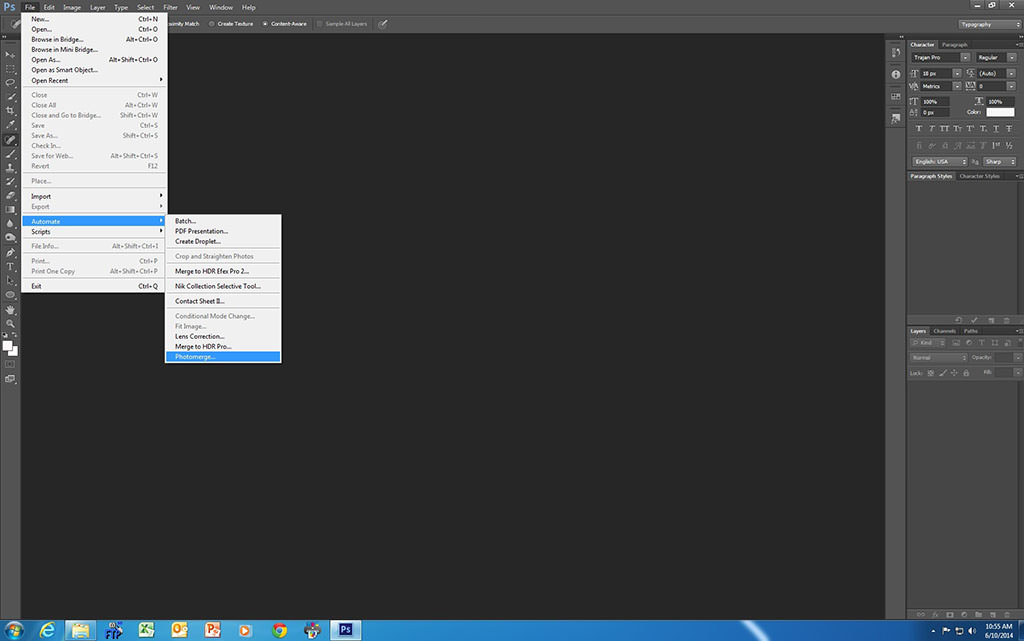
  1. Open up CS6 and click on ‘File’, scroll down to ‘Automate’, click on ‘Photomerge’:
    Step 1
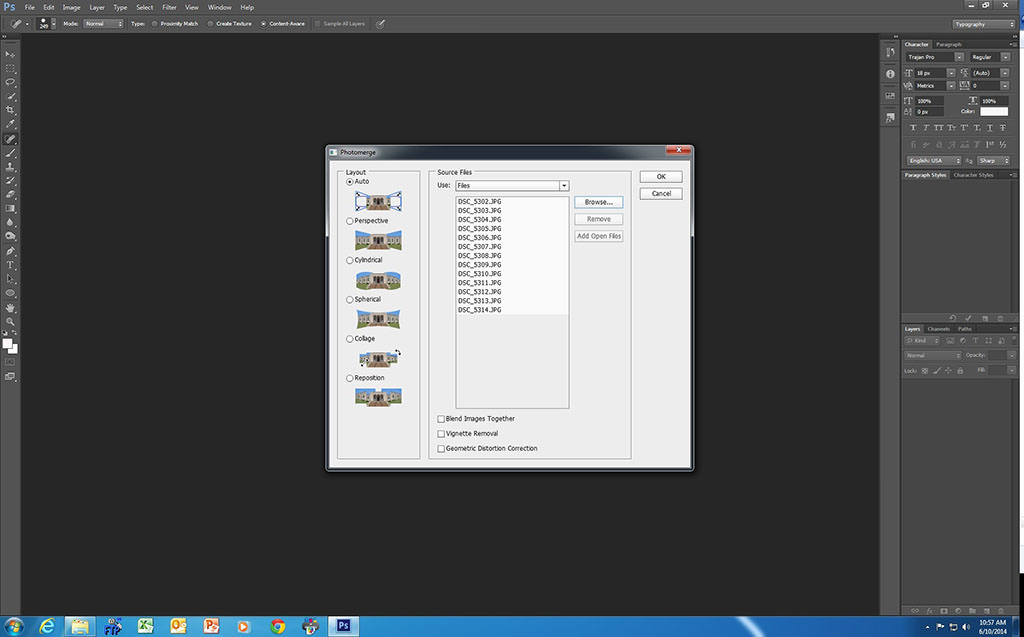
  2. When the Photomerge box opens remove the tick on the ‘Blend images together’ box:
    Step 2
  3. Click on ‘Browse’ and select your set of images. You can use either RAW or jpegs. Don’t mix them. Once you have selected your images, click on ‘OK’:
    Step 3
  4. The files will now appear in the Photomerge box. Highlight all of them by clicking on the first image, then holding down the shift key and clicking on the last image, then click ‘OK’:
    Step 4 Photoshop
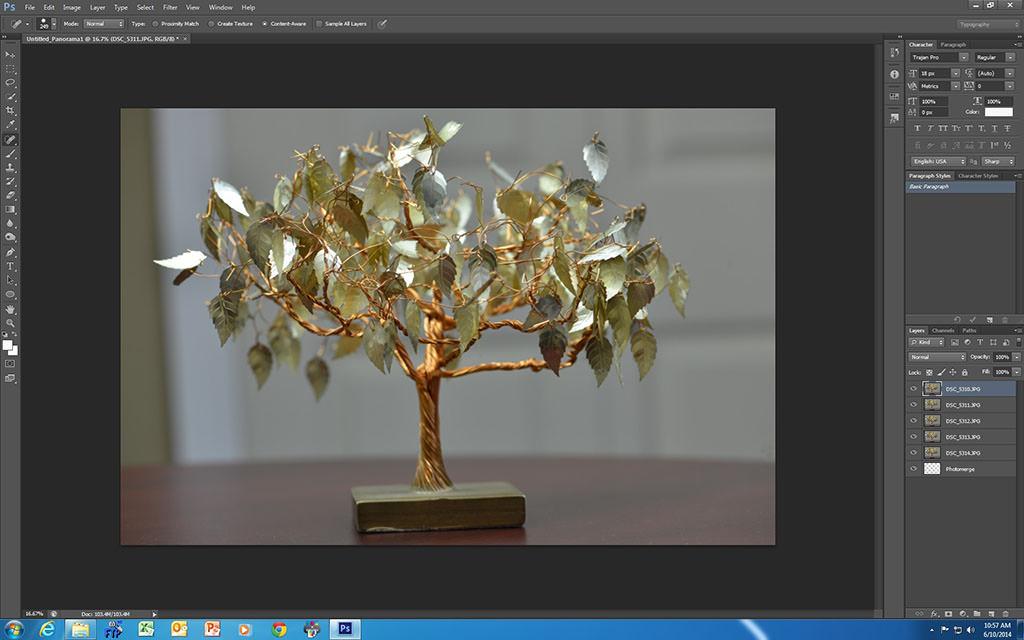
    You will then see the images starting to load on the right hand side of your CS6 screen:
    Step 4
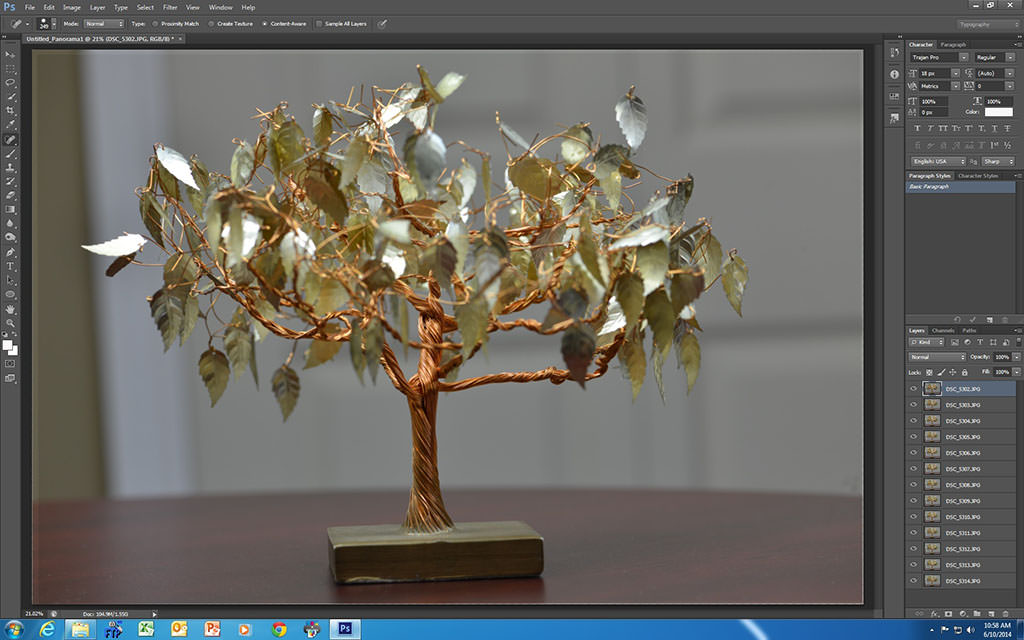
  5. Once they have all loaded, select all of the images listed on the right hand side by clicking on the top image, hold down the shift key, then click on the last image in the list:
    Step 5
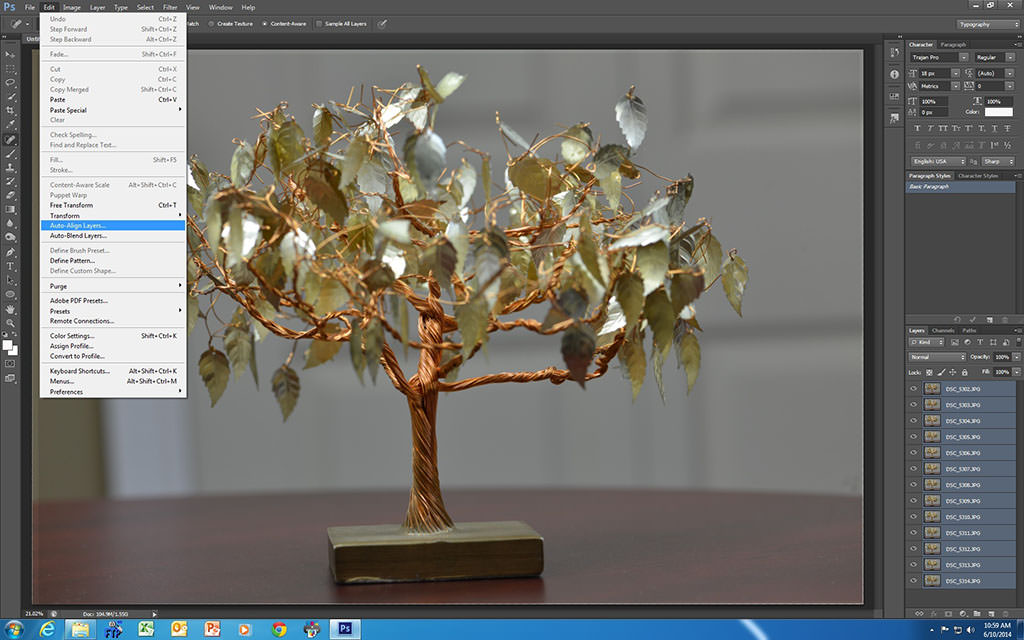
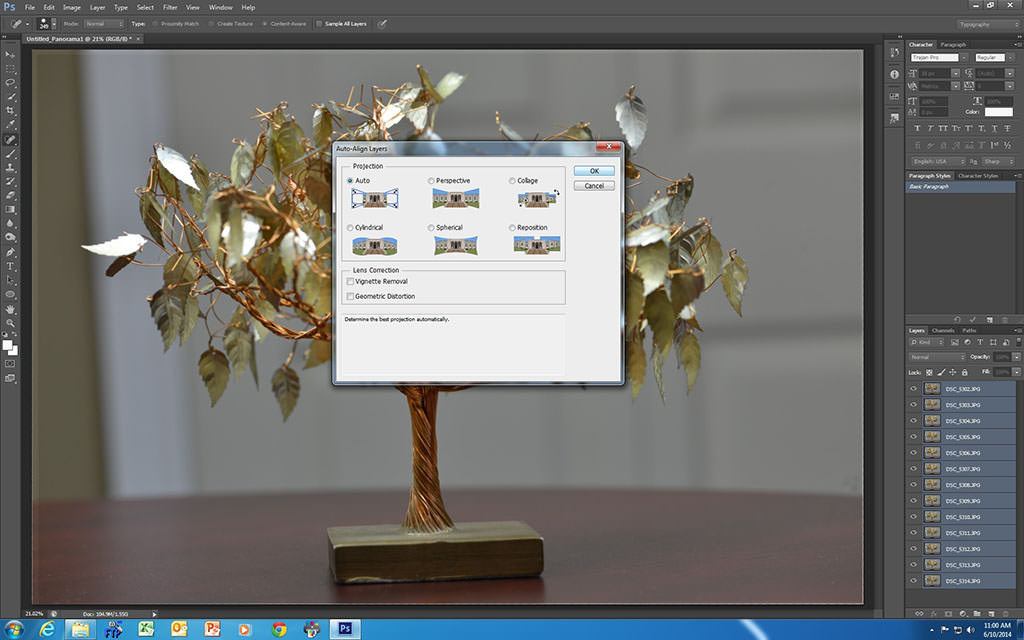
  6. Click on ‘Edit’, scroll down to ‘Auto-Align Layers’ and click on it, make sure the ‘Auto’ setting is selected, then click ‘OK’:
    Step 6
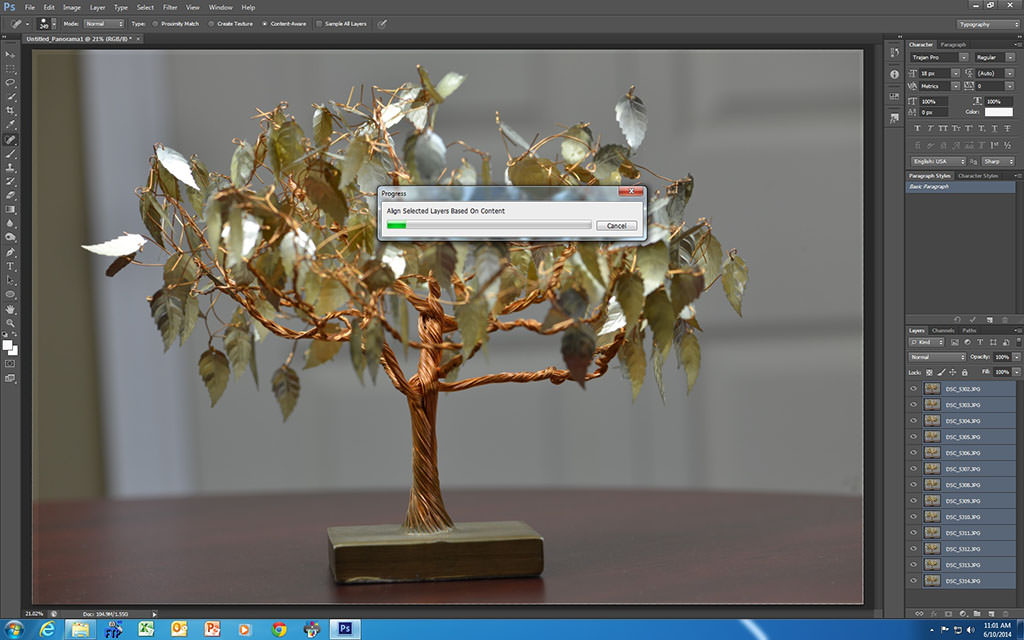
  7. CS6 will now align all of your images for you:
    Step 7
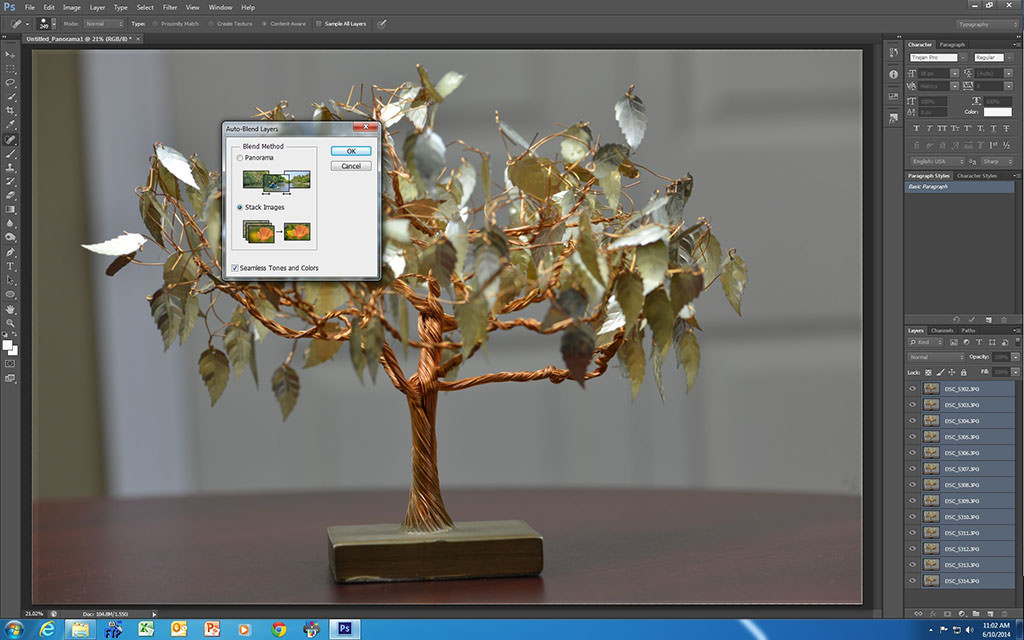
  8. Click on ‘Edit’ again, scroll down to ‘Auto-Blend Layers’, make sure ‘Stacked Images’ and ‘Seamless Tones and Colours’ are selected, then click ‘OK’. CS6 will now blend all of the images together for you:
    Step 8
    Step 8b
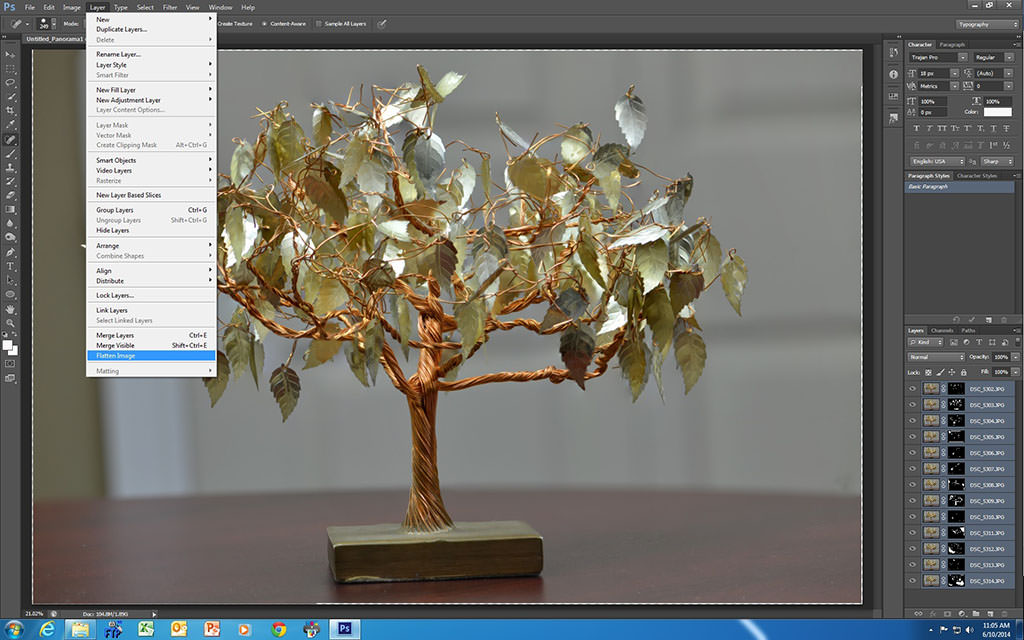
  9. Click on ‘Layer’, then click on ‘Flatten Image’:
    Step 9
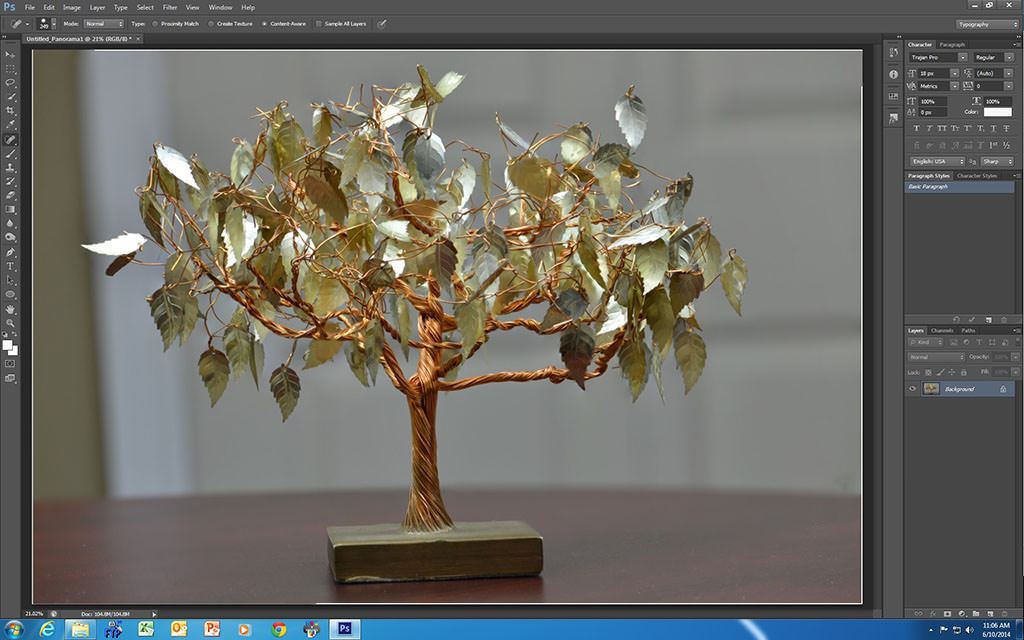
  10. Now you can work on the file with other CS6 adjustments before saving your final output:
    Step 10
Here is the first photo of a series that I took at f/8 with my D800 using my Nikkor 105mm Micro f/2.8 lens. You can see that much of the image is out of focus.
First f/8
NIKON D800 @ 105mm, ISO 400, 10/400, f/8.0
Now compare that image above with the following focus stacked one and you’ll see the advantages of using focus stacking for macro work.
Finished Image
NIKON D800 @ 105mm, ISO 400, 10/400, f/8.0
We’d love to hear about your experiences with focus stacking and some of the techniques that you have used in your work, as well as see some of your samples!

Tuesday, July 7, 2015

White Balance

White Balance

What is white balance?

Imagine if you had to click a switch every time you went from the office to a shop to home, just so that the complexion of people you saw along the way looked “right” and “normal”.
If you literally saw life through a lens, people would look a bit green in the office or glowing orange in the pub. This is to do with the different color temperature of various the light source, ranging from sunlight to shade to artificial lights. These all affect the white balance of the images we see.  
Luckily, our brains do our white balance adjustments for us automatically.  The camera may have the eyes, but not the brain.  In film photography, filters are used to correct the color cast from different light sources.  With digital cameras, you have a selection of virtual filters to choose from.  Ever wondered what the light bulb, sun, cloud, lightning bolt and shed symbols on your DSLR were?  It’s all about setting the correct white balance.
Different light sources emit light at different wavelengths (measured in color temperature) and is the reason for different color casts. Outdoor sunny conditions are pretty close to “white” light while a candle flame will appear much warmer with reds and yellows dominating.
Table of color temperatures - White Balance
Light sourceTemperature (Kelvin)
Match flame1700K
Candle flame1850K
Incandescent light bulb2800-3300K
Sunrise, sunset3350K
Midday sun, electronic flash5000K
Bright sunshine, clear sky5500-6000K
Cloud cover, shade700K
Blue sky9300K

Why is white balance important?

White balance is one of those topics that can easily slide into increasingly complex and geeky explanations complete with charts and graphs. White balance, in the simplest terms, is important for getting the colors as accurate as possible. 
Take a few shots without flash in differently lit locations (tungsten bulbs, fluorescent strips, streetlamps) and you’ll instantly understand what I’m talking about.
In order to correct these variations in color temperature your camera needs to set itself a suitable reference point for the color white. In doing so it can make all the other colors of the spectrum look more natural.
Wrong white balance What happens when the wrong white balance setting is chosen, in this case, tungsten instead of flash or auto. The skin tones take on a very cold, blueish tinge while other colours lose their warmth and vibrancy.Correct white balance Almost the same image but with the Auto white balance enabled. Note the more natural skin tones and warmer range of colours.


How do I choose the right white balance?

You’ll need to refer to your manual on how to select the appropriate white balance for your DSLR.  Here’s an explanation the more common white balance settings:
Autoas you can guess, this is where the camera determines what the best white balance setting is. It doesn't always get it right but it'sworthwhile using.
DaylightThe sun setting.  You may not see much of a difference with this and auto white balance but is meant to be used in daylight
ShadeThe shed setting.  Images shot in shade can be quite blue so this will add some warmth to it.
CloudyThe cloud setting.  Adds some warm tones to normal daylight pictures.  Be careful with this as sometimes your pictures can look quite yellow.
TungstenThe light bulb setting.  Counteracts the strong colour cast from tungsten lighting (usual light bulbs).
FluorescentThe strip light setting. Compensates the greeny-blue of fluorescent lights.
FlashThe lightning bolt setting.  Using flash can introduce a bit of blueness and this setting adds some warmth.